Systems require IP addresses to communicate, but it is a lot of work to assign IP addresses to individual systems manually. DHCP is an automated network management protocol used to dynamically assign an IP address to a system. It centrally manages configurations and doesn’t require network administrators to manually assign IP addresses unless needed for specific reasons. It runs on the application layer of TCP/IP to both dynamically assign IP addresses and to allocate TCP/IP configuration information like subnet mask to default addresses.
Let’s talk about how it works. When you connect a system that is configured to use DHCP to the network, it will broadcast a packet to look for DHCP server. This packet is known as the DHCPDISCOVER packet. The DHCP server that is always listening for DHCPDISCOVER broadcasts picks up the packet and compares the request with the scopes it has defined.
A DHCP scope is a valid range of IP addresses that are available for assignment or lease on a particular subnet. One can configure scope options, such as having it supply a specific address to a system. This action is known as a reservation. Reservations are a means by which you can still use DHCP for a system but at the same time guarantee that it always has the same IP address. When based on the MAC address, this is known as MAC reservations. DHCP can also be configured for exclusions, also called IP exclusions. Exclusion range is a pool of IP addresses in the scope that is excluded from being leased.
If it finds that it has a scope for the network from which the packet originated, it chooses an address from the scope, reserves it, and sends the address, along with any other information, such as the lease duration, back to the new system. All of this reply back to the new system is known as the DHCPOFFER packet.
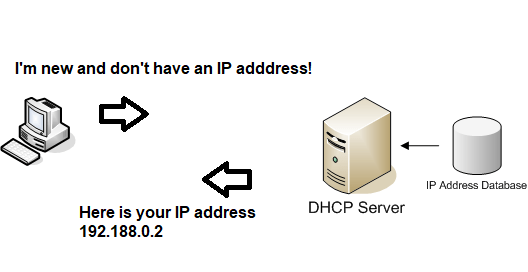
The packet will come back to the newly connected system to be accepted. By default, DHCP operates on ports 67 and 68.
With dynamic DHCP, the IP address assigned is not assigned but leased. Lease duration is the length of time for which the IP address can be used before a lease renewal is required. This is useful for scenarios like temporary employees needing IP addresses for their systems or for systems that admins know will be replaced. Simply put, it makes systems that aren’t using IP addresses anymore give up their IP addresses, making it available again.
On the other hand, statically assigning IP addresses makes IP addresses permanent to a specific system until removed.
A DHCP server manages numerous data. It contains all IP addresses it has allocated and its corresponding MAC addresses, so that if a node is relocated, it can identify it to prevent the accidental configuration of multiple devices with the same IP address. However, with all this data, DHCP server can easily get bogged down trying to respond to all the requests. A DHCP relay acts as a middle man for systems and the server. This feature is useful when working with clients on different subnets, because a client cannot communicate directly with the server until it has the IP configuration information assigned to it. DHCP relay is simply a feature that is used by a switch, also known as the relay agent, to allow DHCP communication between hosts and remote DHCP servers that are not on the same network. You will need to use IP helper-address command for configuring the router as a DHCP relay agent. IP helper-address is simply the command that is used to enable DHCP relay in routers.
 HansITAcademy
You must be logged in to post a comment.