Email header analysis is one of the most critical tools you have on hand when threat hunting. Plenty of threat campaigns use email as a way to distribute malware, so understanding various email headers will help threat hunters detect threats more quickly. Headers have a lot of information, so it’s useful when it comes to detecting spam and phishing emails. Even if email gateways can catch most threats, threat hunters still use email header analysis to track down threats that pass through.
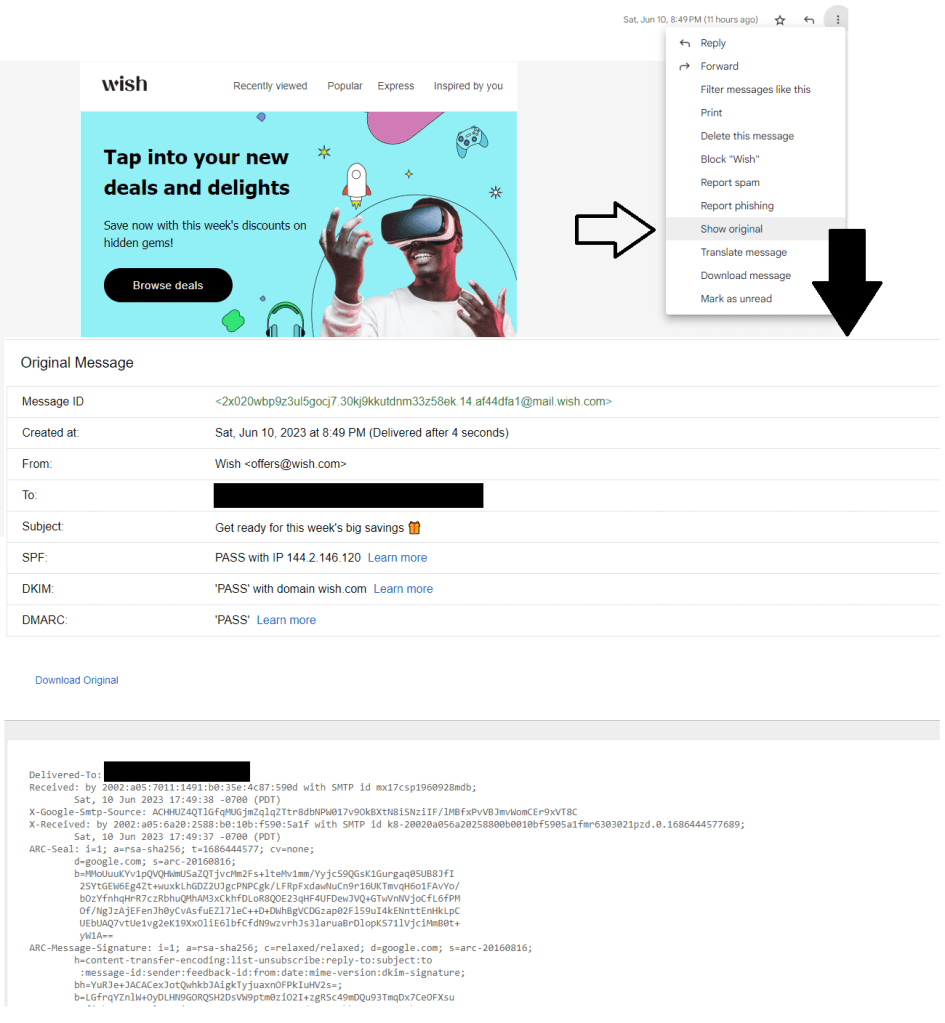
Typical email headers have from, to, date, and the subject, as you can see in the email headers in gmail. If you want to see more detail, simply click on the email and click show original on the top right. Here on gmail, you will see the raw message. You can do this in yahoo and outlook as well. Original message snapshot has message ID, created at, from, to, subject, SPF, and DKIM. At the bottom, you’ll see more details like x received, ARC seal/message signature/authentication results, return path, received, received SPF, authentication results, DKIM signatures, reply to, MIME version, and precedence. You can also use tools like email header analyzer, (https://mxtoolbox.com/EmailHeaders.aspx).
There are some items that can be spoofed like the “from” section and there are some that can’t be spoofed, like the message ID, which is added by the server that processes the email. While it may be helpful to block elements like “from”, it has been proven to be not effective because threat actors can use a technique called hailstorm where they use different sender information thanks to spoofing. Threat hunters use various data to analyze and detect threats. Looking at analytics platform to find misspelling, domain names not matching the supposed seller, gibberish in the email address field, multiple or unrelated recipients, suspicious titles, and more. From an investigation perspective, understanding what each element are in the header is critical.
 HansITAcademy
You must be logged in to post a comment.